第一章 初识SpringMVC
1.1 SpringMVC概述
- SpringMVC是Spring子框架
- SpringMVC是Spring 为【展现层|表示层|表述层|控制层】提供的基于 MVC 设计理念的优秀的 Web 框架,是目前最主流的MVC 框架。
- SpringMVC是非侵入式:可以使用注解让普通java对象,作为请求处理器【Controller】。
- SpringMVC是用来代替Servlet
Servlet作用- 1. 处理请求
- - 将数据共享到域中
- 2. 做出响应
- - 跳转页面【视图】
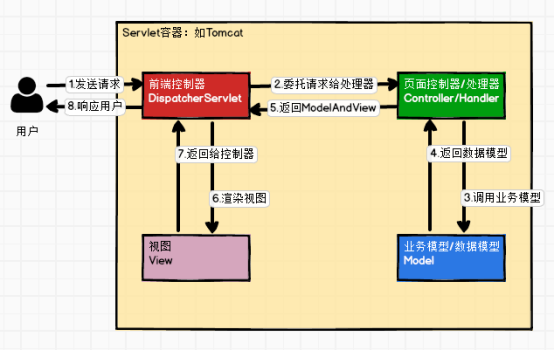
1.2 SpringMVC处理请求原理简图
- 请求
- DispatcherServlet【前端控制器】
- Controller|Handler【请求处理器】
- ModelAndView
- DispatcherServlet渲染视图
- 响应
第二章 SpringMVC搭建框架
2.1 搭建SpringMVC框架
- 创建工程【web工程】
- 导入jar包
- <dependency>
- <groupId>org.springframework</groupId>
- <artifactId>spring-webmvc</artifactId>
- <version>5.3.1</version>
- </dependency>
- <dependency>
- <groupId>org.thymeleaf</groupId>
- <artifactId>thymeleaf-spring5</artifactId>
- <version>3.0.12.RELEASE</version>
- </dependency>
- <dependency>
- <groupId>javax.servlet</groupId>
- <artifactId>javax.servlet-api</artifactId>
- <version>4.0.1</version>
- <scope>provided</scope>
- </dependency>
- 编写配置文件
- web.xml注册DispatcherServlet
- url配置:/
- init-param:contextConfigLocation,设置springmvc.xml配置文件路径【管理容器对象】
- :设置DispatcherServlet优先级【启动服务器时,创建当前Servlet对象】
- springmvc.xml
- 开启组件扫描
- 配置视图解析器【解析视图(设置视图前缀&后缀)】
- 编写请求处理器【Controller|Handler】
- 使用@Controller注解标识请求处理器
- 使用@RequestMapping注解标识处理方法【URL】
- 准备页面进行,测试
第三章 @RequestMapping详解
@RequestMapping注解作用:为指定的类或方法设置相应URL
3.1 @RequestMapping注解位置
- 书写在类上面
- 作用:为当前类设置映射URL
- 注意:不能单独使用,需要与方法上的@RequestMapping配合使用
- 书写在方法上面
- 作用:为当前方法设置映射URL
- 注意:可以单独使用
3.2 @RequestMapping注解属性
- value属性
- path属性
- 类型:String[]
- 作用:与value属性作用一致
- method属性
- 类型:RequestMethod[]
- public enum RequestMethod {
- GET, HEAD, POST, PUT, PATCH, DELETE, OPTIONS, TRACE
- }
- 作用:为当前URL【类或方法】设置请求方式【POST、DELETE、PUT、GET】
- 注意:
- 默认情况:所有请求方式均支持
- 如请求方式不支持,会报如下错误
- 405【Request method 'GET' not supported】
- params
- 类型:String[]
- 作用:为当前URL设置请求参数
- 注意:如设置指定请求参数,但URL中未携带指定参数,会报如下错误
- 400【Parameter conditions "lastName" not met for actual request parameters:】
- headers
- 类型:String[]
- 作用:为当前URL设置请求头信息
- 注意:如设置指定请求头,但URL中未携带请求头,会报如下错误
- 示例代码
- @RequestMapping(value = {"/saveEmp","/insertEmp"},
- method = RequestMethod.GET,
- params = "lastName=lisi",
- headers = "User-Agent=Mozilla/5.0 (Windows NT 10.0; Win64; x64) AppleWebKit/537.36 (KHTML, like Gecko) Chrome/99.0.4844.84 Safari/537.36")
- public String saveEmp(){
- System.out.println("添加员工信息!!!!");
- return SUCCESS;
- }
- @RequestMapping(method = RequestMethod.POST)
- public @interface PostMapping {}
- @RequestMapping(method = RequestMethod.GET)
- public @interface GetMapping {}
- @RequestMapping(method = RequestMethod.PUT)
- public @interface PutMapping {}
- @RequestMapping(method = RequestMethod.DELETE)
- public @interface DeleteMapping {}
3.3 @RequestMapping支持Ant 风格的路径(了解)
- 常用通配符
a) ?:匹配一个字符
b) *:匹配任意字符
c) **:匹配多层路径
- 示例代码
- @RequestMapping("/testAnt/**")
- public String testAnt(){
- System.out.println("==>testAnt!!!");
- return SUCCESS;
- }
第四章 @PathVariable 注解
4.1 @PathVariable注解位置
- @Target(ElementType.PARAMETER)
4.2 @PathVariable注解作用
- 获取URL中占位符参数
- 占位符语法:{}
- 示例代码
- <a th:target="_blank" href="https://www.cnblogs.com/@{/EmpController/testPathVariable/1001}">测试PathVariable注解</a><br>
- /**
- * testPathVariable
- * @return
- */
- @RequestMapping("/testPathVariable/{empId}")
- public String testPathVariable(@PathVariable("empId") Integer empId){
- System.out.println("empId = " + empId);
- return SUCCESS;
- }
4.3 @PathVariable注解属性
- value属性
- name属性
- 类型:String
- 作用:与name属性的作用一致
- required属性
- 类型:boolean
- 作用:设置当前参数是否必须入参【默认值:true】
- true:表示当前参数必须入参,如未入参会报如下错误
- Missing URI template variable 'empId' for method parameter of type Integer
- false:表示当前参数不必须入参,如未入参,会装配null值
第五章 REST【RESTful】风格CRUD
5.1 REST的CRUD与传统风格CRUD对比
- 传统风格CRUD
- 功能 URL 请求方式
- 增 /insertEmp POST
- 删 /deleteEmp?empId=1001 GET
- 改 /updateEmp POST
- 查 /selectEmp?empId=1001 GET
- REST风格CRUD
- 功能 URL 请求方式
- 增 /emp POST
- 删 /emp/1001 DELETE
- 改 /emp PUT
- 查 /emp/1001 GET
5.2 REST风格CRUD优势
5.3 实现PUT&DELETE提交方式步骤
- 注册过滤器HiddenHttpMethodFilter
- 设置表单的提交方式为POST
- 设置参数:_method=PUT或_method=DELETE
5.4 源码解析HiddenHttpMethodFilter
- public static final String DEFAULT_METHOD_PARAM = "_method";
- private String methodParam = DEFAULT_METHOD_PARAM;
- @Override
- protected void doFilterInternal(HttpServletRequest request, HttpServletResponse response, FilterChain filterChain)
- throws ServletException, IOException {
- HttpServletRequest requestToUse = request;
- if ("POST".equals(request.getMethod()) && request.getAttribute(WebUtils.ERROR_EXCEPTION_ATTRIBUTE) == null) {
- String paramValue = request.getParameter(this.methodParam);
- if (StringUtils.hasLength(paramValue)) {
- String method = paramValue.toUpperCase(Locale.ENGLISH);
- if (ALLOWED_METHODS.contains(method)) {
- requestToUse = new HttpMethodRequestWrapper(request, method);
- }
- }
- }
- filterChain.doFilter(requestToUse, response);
- }
- /**
- * Simple {@link HttpServletRequest} wrapper that returns the supplied method for
- * {@link HttpServletRequest#getMethod()}.
- */
- private static class HttpMethodRequestWrapper extends HttpServletRequestWrapper {
- private final String method;
- public HttpMethodRequestWrapper(HttpServletRequest request, String method) {
- super(request);
- this.method = method;
- }
- @Override
- public String getMethod() {
- return this.method;
- }
- }
使用Servlet处理请求数据
- 请求参数
- String param = request.getParameter();
- 请求头
- Cookie
6.1 处理请求参数
- 默认情况:可以将请求参数名,与入参参数名一致的参数,自动入参【自动类型转换】
- SpringMVC支持POJO入参
- 要求:请求参数名与POJO的属性名保持一致
- 示例代码
- <form th:action="@{/saveEmp}" method="POST">
- id:<input type="text" name="id"><br>
- LastName:<input type="text" name="lastName"><br>
- Email:<input type="text" name="email"><br>
- Salary:<input type="text" name="salary"><br>
- <input type="submit" value="添加员工信息">
- </form>
- /**
- * 获取请求参数POJO
- * @return
- */
- @RequestMapping(value = "/saveEmp",method = RequestMethod.POST)
- public String saveEmp(Employee employee){
- System.out.println("employee = " + employee);
- return SUCCESS;
- }
- @RequestParam注解
- 作用:如请求参数与入参参数名不一致时,可以使用@RequestParam注解设置入参参数名
- 属性
- value
- name
- 类型:String
- 作用:与value属性作用一致
- required
- 类型:Boolean
- 作用:设置当前参数,是否必须入参
- true【默认值】:表示当前参数必须入参,如未入参会报如下错误
- 400【Required String parameter 'sName' is not present】
- false:表示当前参数不必须入参,如未入参,装配null值
- defaultValue
- 类型:String
- 作用:当装配数值为null时,指定当前defaultValue默认值
- 示例代码
- /**
- * 获取请求参数
- * @return
- */
- @RequestMapping("/requestParam1")
- public String requestParam1(@RequestParam(value = "sName",required = false,
- defaultValue = "zhangsan")
- String stuName,
- Integer stuAge){
- System.out.println("stuName = " + stuName);
- System.out.println("stuAge = " + stuAge);
- return SUCCESS;
- }
6.2 处理请头
- 语法:@RequestHeader注解
- 属性
- value
- name
- 类型:String
- 作用:与value属性作用一致
- required
- 类型:boolean
- 作用:【默认值true】
- true:设置当前请求头是否为必须入参,如未入参会报如下错误
- 400【Required String parameter 'sName' is not present】
- false:表示当前参数不必须入参,如未入参,装配null值
- defaultValue
- 类型:String
- 作用:当装配数值为null时,指定当前defaultValue默认值
- 示例代码
- <a th:target="_blank" href="https://www.cnblogs.com/@{/testGetHeader}">测试获取请求头</a>
- /**
- * 获取请求头
- * @return
- */
- @RequestMapping(value = "/testGetHeader")
- public String testGetHeader(@RequestHeader("Accept-Language")String al,
- @RequestHeader("Referer") String ref){
- System.out.println("al = " + al);
- System.out.println("ref = " + ref);
- return SUCCESS;
- }
6.3 处理Cookie信息
- 语法:@CookieValue获取Cookie数值
- 属性
- value
- 类型:String
- 作用:设置需要获取Cookie名称
- name
- 类型:String
- 作用:与value属性作用一致
- required
- 类型:boolean
- 作用:【默认值true】
- true:设置当前Cookie是否为必须入参,如未入参会报如下错误
- 400【Required String parameter 'sName' is not present】
- false:表示当前Cookie不必须入参,如未入参,装配null值
- defaultValue
- 类型:String
- 作用:当装配数值为null时,指定当前defaultValue默认值
- 示例代码
- <a th:target="_blank" href="https://www.cnblogs.com/@{/setCookie}">设置Cookie信息</a><br>
- <a th:target="_blank" href="https://www.cnblogs.com/@{/getCookie}">获取Cookie信息</a><br>
- /**
- * 设置Cookie
- * @return
- */
- @RequestMapping("/setCookie")
- public String setCookie(HttpSession session){
- // Cookie cookie = new Cookie();
- System.out.println("session.getId() = " + session.getId());
- return SUCCESS;
- }
- /**
- * 获取Cookie
- * @return
- */
- @RequestMapping("/getCookie")
- public String getCookie(@CookieValue("JSESSIONID")String cookieValue){
- System.out.println("cookieValue = " + cookieValue);
- return SUCCESS;
- }
6.4 使用原生Servlet-API
- @RequestMapping("/useRequestObject")
- public String useRequestObject(HttpServletRequest request){}
7.1 使用ModelAndView
- 使用ModelAndView对象作为方法返回值类型,处理响应数据
- ModelAndView是模型数据与视图对象的集成对象,源码如下
- public class ModelAndView {
- /** View instance or view name String. */
- //view代表view对象或viewName【建议使用viewName】
- @Nullable
- private Object view;
- /** Model Map. */
- //ModelMap集成LinkedHashMap,存储数据
- @Nullable
- private ModelMap model;
-
- /**
- 设置视图名称
- */
- public void setViewName(@Nullable String viewName) {
- this.view = viewName;
- }
- /**
- * 获取视图名称
- */
- @Nullable
- public String getViewName() {
- return (this.view instanceof String ? (String) this.view : null);
- }
- /**
- 获取数据,返回Map【无序,model可以为null】
- */
- @Nullable
- protected Map<String, Object> getModelInternal() {
- return this.model;
- }
- /**
- * 获取数据,返回 ModelMap【有序】
- */
- public ModelMap getModelMap() {
- if (this.model == null) {
- this.model = new ModelMap();
- }
- return this.model;
- }
- /**
- * 获取数据,返回Map【无序】
- */
- public Map<String, Object> getModel() {
- return getModelMap();
- }
-
- /**
- 设置数据
- */
- public ModelAndView addObject(String attributeName, @Nullable Object attributeValue) {
- getModelMap().addAttribute(attributeName, attributeValue);
- return this;
- }
-
-
- }
-
- 示例代码
- @GetMapping("/testMvResponsedata")
- public ModelAndView testMvResponsedata(){
- ModelAndView mv = new ModelAndView();
- //设置逻辑视图名
- mv.setViewName("response_success");
- //设置数据【将数据共享到域中(request\session\servletContext)】
- mv.addObject("stuName","zhouxu");
- return mv;
- }
7.2 使用Model、ModelMap、Map
- 使用Model、ModelMap、Map作为方法入参,处理响应数据
- 示例代码
- /**
- * 使用Map、Model、ModelMap处理响应数据
- * @return
- */
- @GetMapping("/testMapResponsedata")
- public String testMapResponsedata(Map<String,Object> map
- /* Model model
- ModelMap modelMap*/){
- map.put("stuName","zhangsan");
- // model.addAttribute("stuName","lisi");
- // modelMap.addAttribute("stuName","wangwu");
- return "response_success";
- }
7.3 SpringMVC中域对象
- SpringMVC封装数据,默认使用request域对象
- session域的使用
- 方式一
- /**
- * 测试响应数据【其他域对象】
- * @return
- */
- @GetMapping("/testScopeResponsedata")
- public String testScopeResponsedata(HttpSession session){
- session.setAttribute("stuName","xinlai");
- return "response_success";
- }
- 方式二
- @Controller
- @SessionAttributes(value = "stuName") //将request域中数据,同步到session域中
- public class TestResponseData {
- /**
- * 使用ModelAndView处理响应数据
- * @return
- */
- @GetMapping("/testMvResponsedata")
- public ModelAndView testMvResponsedata(){
- ModelAndView mv = new ModelAndView();
- //设置逻辑视图名
- mv.setViewName("response_success");
- //设置数据【将数据共享到域中(request\session\servletContext)】
- mv.addObject("stuName","zhouxu");
- return mv;
- }
- }
第八章 SpringMVC处理请求响应乱码
8.1 源码解析CharacterEncodingFilter
- public class CharacterEncodingFilter extends OncePerRequestFilter {
- //需要设置字符集
- @Nullable
- private String encoding;
- //true:处理请乱码
- private boolean forceRequestEncoding = false;
- //true:处理响应乱码
- private boolean forceResponseEncoding = false;
-
- public String getEncoding() {
- return this.encoding;
- }
-
- public boolean isForceRequestEncoding() {
- return this.forceRequestEncoding;
- }
-
- public void setForceResponseEncoding(boolean forceResponseEncoding) {
- this.forceResponseEncoding = forceResponseEncoding;
- }
-
- public void setForceEncoding(boolean forceEncoding) {
- this.forceRequestEncoding = forceEncoding;
- this.forceResponseEncoding = forceEncoding;
- }
-
- @Override
- protected void doFilterInternal(
- HttpServletRequest request, HttpServletResponse response, FilterChain filterChain)
- throws ServletException, IOException {
- String encoding = getEncoding();
- if (encoding != null) {
- if (isForceRequestEncoding() || request.getCharacterEncoding() == null) {
- request.setCharacterEncoding(encoding);
- }
- if (isForceResponseEncoding()) {
- response.setCharacterEncoding(encoding);
- }
- }
-
- filterChain.doFilter(request, response);
-
- }
-
-
- }
- SpringMVC底层默认处理响应乱码
- SpringMVC处理请求乱码步骤
- 注册CharacterEncodingFilter
- 注册CharacterEncodingFilter必须是第一Filter位置
- 为CharacterEncodingFilter中属性encoding赋值
- 为CharacterEncodingFilter中属性forceRequestEncoding赋值
- 示例代码
- <filter>
- <filter-name>CharacterEncodingFilter</filter-name>
- <filter-class>org.springframework.web.filter.CharacterEncodingFilter</filter-class>
- <init-param>
- <param-name>encoding</param-name>
- <param-value>UTF-8</param-value>
- </init-param>
- <init-param>
- <param-name>forceRequestEncoding</param-name>
- <param-value>true</param-value>
- </init-param>
- </filter>
- <filter-mapping>
- <filter-name>CharacterEncodingFilter</filter-name>
- <url-pattern>/*</url-pattern>
- </filter-mapping>
第九章 源码解析SpringMVC工作原理
9.1 Controller中方法的返回值问题
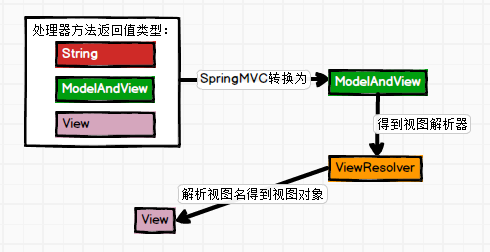
- 无论方法返回是ModelAndView还是String,最终SpringMVC底层,均会封装为ModelAndView对象
- //DispatcherServlet的1061行代码
- ModelAndView mv = null;
- mv = ha.handle(processedRequest, response, mappedHandler.getHandler());
- SpringMVC解析mv【ModelAndView】
- //DispatcherServlet的1078行代码
- processDispatchResult(processedRequest, response, mappedHandler, mv, dispatchException);
- ThymeleafView对象中344行代码【SpringMVC底层处理响应乱码】
- //computedContentType="text/html;charset=UTF-8"
- response.setContentType(computedContentType);
- WebEngineContext对象中783行代码【SpringMVC底层将数据默认共享到request域】
- this.request.setAttribute(name, value);
9.2 视图及视图解析器源码
- 视图解析器将View从ModelAndView中解析出来
- ThymeleafViewResolver的837行代码
- //底层使用反射的方式,newInstance()创建视图对象
- final AbstractThymeleafView viewInstance = BeanUtils.instantiateClass(getViewClass());
第十章 SpringMVC视图及视图解析器
10.1 视图解析器对象【ViewResolver】
- 概述:ViewResolver接口的实现类或子接口,称之为视图解析器
- 作用:将ModelAndView中的View对象解析出来
10.2 视图对象【View】
- 概述:View接口的实现类或子接口,称之为视图对象
- 作用:视图渲染
第十一章 视图控制器&重定向&加载静态资源
11.1 视图控制器
- 语法:view-controller
- 步骤
- 添加标签:为指定URL映射html页面
- 添加
- 有20+种功能
- 配置了标签之后会导致其他请求路径都失效,添加解决
11.2 重定向
- 语法:return "redirect:/xxx.html";
11.3 加载静态资源
- 由DefaultServlet加载静态资源到服务器
- 静态资源:html、css、js等资源
- tomcat->conf->web.xml关键代码如下:
- <servlet>
- <servlet-name>default</servlet-name>
- <servlet-class>org.apache.catalina.servlets.DefaultServlet</servlet-class>
- <init-param>
- <param-name>debug</param-name>
- <param-value>0</param-value>
- </init-param>
- <init-param>
- <param-name>listings</param-name>
- <param-value>false</param-value>
- </init-param>
- <load-on-startup>1</load-on-startup>
- </servlet>
- <servlet-mapping>
- <servlet-name>default</servlet-name>
- <url-pattern>/</url-pattern>
- </servlet-mapping>
- 发现问题
- DispatcherServlet与DefaultServlet的URL配置均为:/,导致DispatcherServlet中的配置将DefaultServlet配置的/覆盖了【DefaultServlet失效,无法加载静态资源】
- 解决方案
- [/code]
- [/list][size=3]11.4 源码解析重定向原理[/size]
- [list]
- [*]创建RedirectView对象【ThymeleafViewResolver的775行代码】
- [code]// Process redirects (HTTP redirects)
- if (viewName.startsWith(REDIRECT_URL_PREFIX)) {
- vrlogger.trace("[THYMELEAF] View "{}" is a redirect, and will not be handled directly by ThymeleafViewResolver.", viewName);
- final String redirectUrl = viewName.substring(REDIRECT_URL_PREFIX.length(), viewName.length());
- final RedirectView view = new RedirectView(redirectUrl, isRedirectContextRelative(), isRedirectHttp10Compatible());
- return (View) getApplicationContext().getAutowireCapableBeanFactory().initializeBean(view, REDIRECT_URL_PREFIX);
- }
- RedirectView视图渲染
- RedirectView对象URL处理【330行代码】

- 执行重定向【RedirectView的627行代码】

第十二章 REST风格CRUD练习
12.1 搭建环境
- 导入相关jar包
- <dependency>
- <groupId>org.springframework</groupId>
- <artifactId>spring-webmvc</artifactId>
- <version>5.3.1</version>
- </dependency>
- <dependency>
- <groupId>org.thymeleaf</groupId>
- <artifactId>thymeleaf-spring5</artifactId>
- <version>3.0.12.RELEASE</version>
- </dependency>
- <dependency>
- <groupId>javax.servlet</groupId>
- <artifactId>javax.servlet-api</artifactId>
- <version>4.0.1</version>
- <scope>provided</scope>
- </dependency>
- 编写配置文件
- web.xml
- CharacterEncodingFilter
- HiddenHttpMethodFilter
- DispatcherServlet
- springmvc.xml
- 开启组件扫描
- 装配视图解析器
- 装配视图控制器
- 解决静态资源加载问题
- 装配annotation-driver
- dao&pojo
12.2 实现功能思路
- 实现添加功能思路
- 实现删除功能思路
- 方式一:直接使用表单实现DELETE提交方式
- 方式二:使用超链接【a】实现DELETE提交方式
- 使用Vue实现单击超链接,后提交对应表单
- 取消超链接默认行为
- 示例代码
- <a target="_blank" href="https://www.cnblogs.com/#" @click="deleteEmp">删除</a>
- <form id="delForm" th:action="@{/emps/}+${emp.id}" method="post">
- <input type="hidden" name="_method" value="DELETE">
- </form>
免责声明:如果侵犯了您的权益,请联系站长,我们会及时删除侵权内容,谢谢合作! |







 发表于 2023-2-16 01:04:15