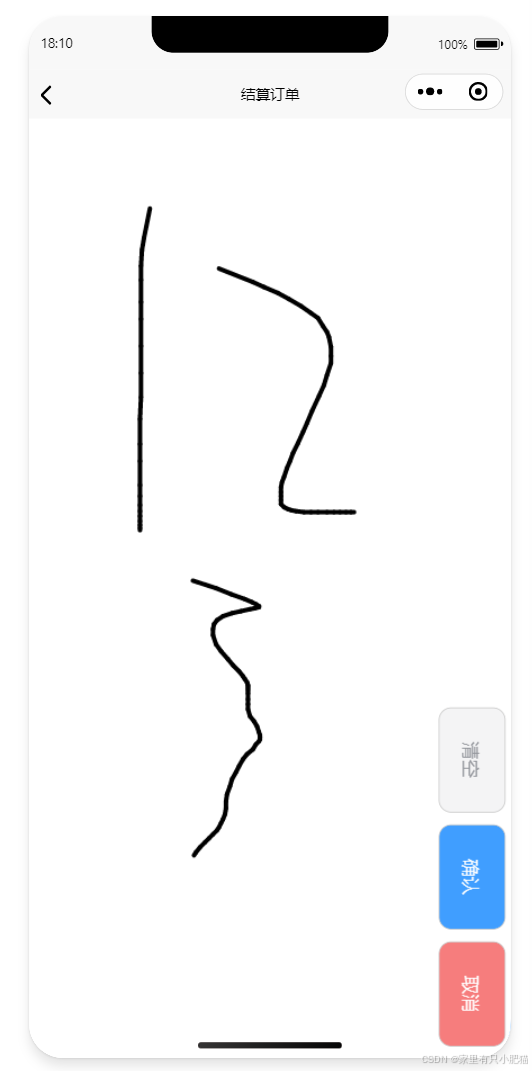
插件市场大佬封装好的 组件 可以直接拿已往- <template>
- <view
- class="whole canvas-autograph flexc"
- @touchmove.prevent.stop
- @wheel.prevent.stop
- v-show="modelValue"
- >
- <canvas
- class="scroll-view"
- id="mycanvas"
- canvas-id="mycanvas"
- @touchstart="touchstart"
- @touchmove="touchmove"
- @touchend="touchend"
- />
- <view class="fun-box">
- <view
- class="fun-box-btn clear flex"
- @click="clear"
- >
- <text>清空</text>
- </view>
- <view
- class="fun-box-btn confirm flex"
- @click="confirm"
- >
- <text>确认</text>
- </view>
- <view
- class="fun-box-btn cancel flex"
- @click="cancel"
- >
- <text>取消</text>
- </view>
- </view>
- </view>
- </template>
- <script setup>
- /*
- 使用如下
- <canvas-autograph v-model="isCanvas" @complete="complete"/>
-
- // 打开、关闭
- let isCanvas = ref(false)
- // 确认事件
- const complete = e=>{
- console.log(e)
- }
-
- */
- import { ref, reactive, watch, getCurrentInstance } from 'vue'
- const hasSignature = ref(false) // 新增:记录是否签名
- const emits = defineEmits(['update:modelValue', 'complete'])
- const props = defineProps({
- modelValue: Boolean
- })
- const _this = getCurrentInstance()
- watch(
- () => props.modelValue,
- (e) => {
- // 这里可进行 tabbar 的 显示、隐藏 不要也可以
- // 自己写
- },
- {
- immediate: true // 是否默认执行一次 默认为false
- }
- )
- let points = reactive([]) //路径点集合
- let canvaCtx = reactive(uni.createCanvasContext('mycanvas', _this)) //创建绘图对象
- //设置画笔样式
- canvaCtx.lineWidth = 4
- canvaCtx.lineCap = 'round'
- canvaCtx.lineJoin = 'round'
- //触摸开始,获取到起点
- const touchstart = (e) => {
- hasSignature.value = true // 有触摸操作则认为有签名
- let startX = e.changedTouches[0].x
- let startY = e.changedTouches[0].y
- let startPoint = { X: startX, Y: startY }
- points.push(startPoint)
- //每次触摸开始,开启新的路径
- canvaCtx.beginPath()
- }
- //触摸移动,获取到路径点
- const touchmove = (e) => {
- let moveX = e.changedTouches[0].x
- let moveY = e.changedTouches[0].y
- let movePoint = { X: moveX, Y: moveY }
- points.push(movePoint) //存点
- let len = points.length
- if (len >= 2) {
- draw()
- }
- }
- //绘制路径
- const draw = () => {
- let point1 = points[0]
- let point2 = points[1]
- points.shift()
- canvaCtx.moveTo(point1.X, point1.Y)
- canvaCtx.lineTo(point2.X, point2.Y)
- canvaCtx.stroke()
- canvaCtx.draw(true)
- }
- // 触摸结束,将未绘制的点清空防止对后续路径产生干扰
- const touchend = (e) => {
- points = []
- }
- // 清空画布
- const clear = () => {
- hasSignature.value = false // 清空时重置签名标志
- return uni
- .getSystemInfo()
- .then((res) => {
- canvaCtx.clearRect(0, 0, res.windowWidth, res.windowHeight)
- canvaCtx.draw(true)
- return res
- })
- .catch((err) => {
- // console.log(err);
- })
- }
- // 确认
- const confirm = () => {
- if (!hasSignature.value) {
- // 如果没有签名,提示用户
- uni.showToast({
- title: '请先签名',
- icon: 'none',
- duration: 2000
- })
- return
- }
- uni.canvasToTempFilePath({ canvasId: 'mycanvas' }, _this, _this.parent).then((res) => {
- console.log(res.tempFilePath)
- emits('complete', res.tempFilePath)
- cancel()
- })
- }
- // 取消
- const cancel = () => {
- clear().then((res) => emits('update:modelValue', false))
- }
- </script>
- <style scoped lang="scss">
- .canvas-autograph {
- position: fixed;
- z-index: 99999;
- width: 100vw;
- height: 100vh;
- top: 0;
- left: 0;
- .scroll-view {
- width: 100%;
- height: 100%;
- background-color: #ffffff;
- }
- .fun-box {
- position: absolute;
- right: 0;
- bottom: 10vh;
- height: auto;
- display: flex;
- flex-direction: column;
- .fun-box-btn {
- width: 100rpx;
- height: 160rpx;
- color: #ffffff;
- border-radius: 20rpx;
- border: 1rpx solid #c0c0c0;
- display: flex;
- align-items: center;
- justify-content: center;
- margin-bottom: 20rpx;
- margin-right: 10rpx;
- text {
- transform: rotate(90deg);
- }
- }
- .clear {
- color: #909399;
- background-color: #f4f4f5;
- }
- .confirm {
- background-color: #409eff;
- }
- .cancel {
- background-color: #f67d7d;
- }
- }
- }
- </style>
- <miliu-autograph
- v-model="isCanvas"
- @complete="complete"
- ></miliu-autograph>
- let isCanvas = ref(false)
- function toCanvas() {
- isCanvas.value = true
- }
- // 确认事件
- const complete = (e) => {
- console.log(e) // 返回本地生成的base图片路径
- // 上传签名图片
- uni.getImageInfo({
- src: e,
- success: function (res) {
- // uni.uploadFile({
- // url: baseUrl + '/file/upload', //后端接口地址
- // name: 'file', //必填 , 此为类型名称
- // filePath: res.path, //电子签名图片路径
- // header: {
- // Authorization: 'Bearer ' + that.token
- // },
- // success: (res) => {
- // console.log(res, '签名信息 ------ res');
- // //上传成功后逻辑
- // uni.showToast({
- // title: '签名成功!'
- // });
- // },
- // fail: (err) => {
- // console.log(err);
- // uni.showToast({
- // title: '签名失败!'
- // });
- // }
- // });
- }
- })
- }
免责声明:如果侵犯了您的权益,请联系站长,我们会及时删除侵权内容,谢谢合作!qidao123.com:ToB企服之家,中国第一个企服评测及软件市场,开放入驻,技术点评得现金 |







 发表于 2025-12-30 09:31:45